Retention
The Loan Officer's Guide to Database Reactivation: Turn Cold Contacts Into Warm Referrals
.png)
You've got 247 past clients sitting in your database right now.
Maybe it's 147. Maybe it's 547. But here's what they all have in common: you haven't talked to most of them in months—or years. And they definitely aren't thinking about you.
That database represents roughly $2.4 million in potential lifetime value, but it's collecting digital dust while you're chasing expensive lead sources and fighting for scraps on Zillow.
If you closed 35 loans last year but only got 4 referrals from past clients, this guide is for you.
We're going to walk through exactly how to reactivate your dormant database—not with aggressive sales tactics or awkward "just checking in" messages, but with a systematic, value-first approach that turns cold contacts into your most reliable referral source.
Why Your Database Is Your Best Untapped Lead Source (And Why It's Been Ignored)
Let's start with an uncomfortable truth: most loan officers treat their database like a trophy case instead of a garden.
You close a loan, add the client to your CRM, send a closing gift, and then... crickets. Before you know it, 18 months have passed. Here's what's happening in that time:
- Your clients are forgetting you. 71% will within 13 months of closing.
- Life is happening to them. Promotions, kids, home repairs, investment properties, parents downsizing. All moments where they need (or could refer) a mortgage professional.
- Your competition is staying in touch. That annoying LO sending monthly market updates? They're becoming your clients' "mortgage person" by default.
- Referrals are passing you by. Your clients know an average of 12 people who will buy or refinance in the next 3 years. If you're not top-of-mind, those referrals go elsewhere, or nowhere.
Acquiring a new client costs $2,000–3,500. Reactivating an existing relationship costs almost nothing, with a dramatically higher conversion rate. Your database isn't just a lead source. It's THE lead source.
So why have you been ignoring it? Three psychological barriers:
- Guilt. Reaching out after years of silence feels awkward.
- Uncertainty. You don't know what value to offer, and calling just to ask for referrals feels gross.
- Overwhelm. You can't call everyone, and a mass email feels desperate.
Good news: this guide solves all three.
The Real Cost of a Dormant Database: What You're Leaving on the Table
Before we get into the "how," let's get clear on the "why" with some actual numbers.
*Use this interactive calculator! 👇
The Database Reactivation Framework: A 90-Day Plan
Okay, let's get tactical.
This framework is designed to take a completely cold database and systematically warm it up over 90 days. By the end of this period, you'll have re-established relationships, positioned yourself as a trusted resource, and created natural opportunities for referrals and repeat business.
Phase 1: Segmentation & Preparation (Days 1-14)
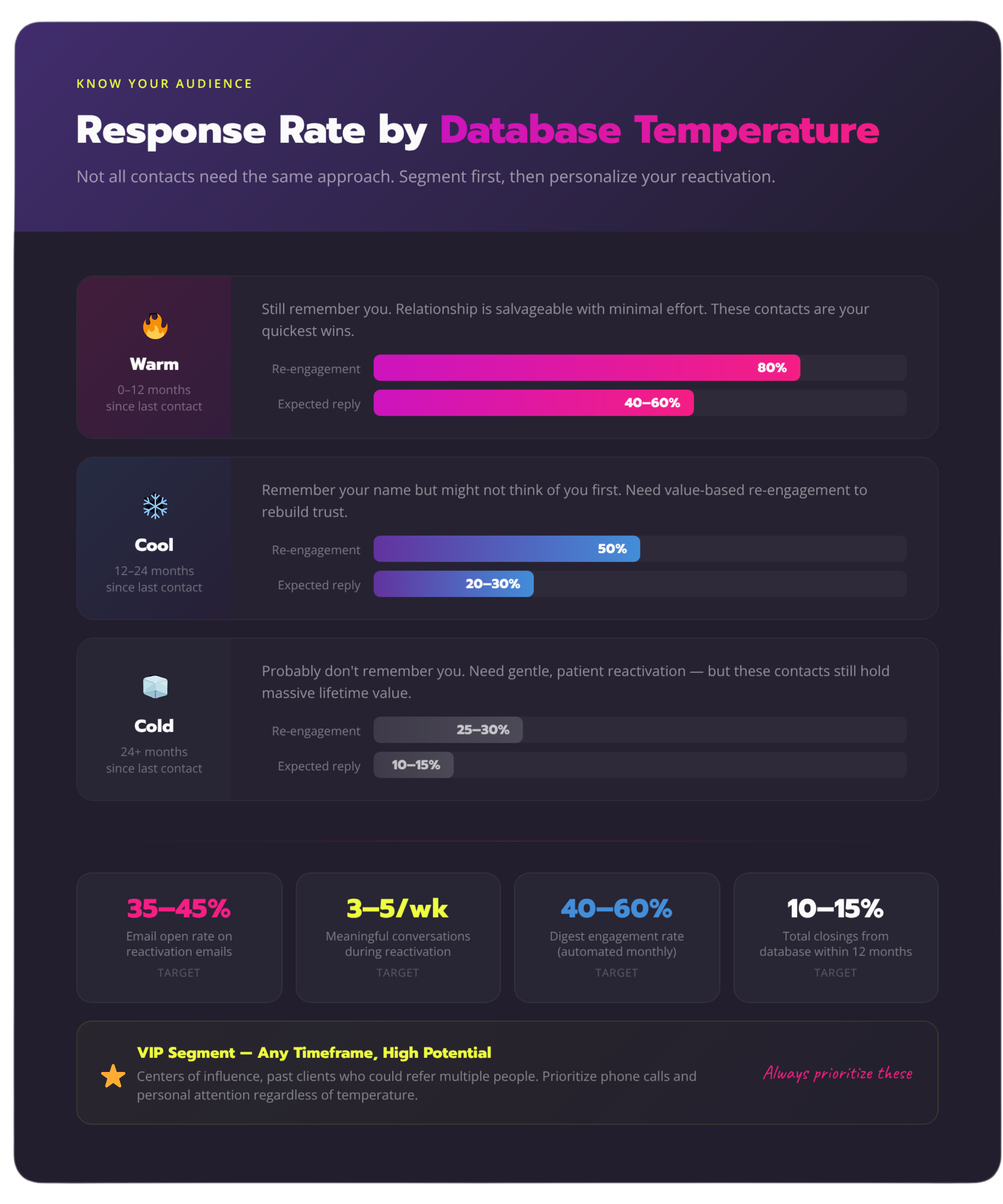
You can't treat all database contacts the same way. Someone you closed 6 months ago needs a different approach than someone from 4 years ago.
Step 1: Categorize Your Database
Sort your contacts into these buckets:
- Warm (0-12 months since last contact): Still remember you, relationship is salvageable with minimal effort
- Cool (12-24 months since last contact): Remember your name but might not think of you first; need value-based re-engagement
- Cold (24+ months since last contact): Probably don't remember you; need gentle, patient reactivation
- VIP (any timeframe, but high potential): Influencers, centers of influence, past clients who could refer multiple people
Step 2: Audit Your Data Quality
Before you start reaching out, make sure you have:
- Current email addresses (expect 15-20% bounce rate on old emails).
- Current phone numbers
- Current home addresses
- Basic info: loan type, closing date, property address
Use data enrichment services if needed, or plan to update info as you reconnect.
*Use this interactive quiz! 👇
Step 3: Set Realistic Goals
For your first 90-day reactivation:
- Warm contacts: Aim for 80% re-engagement (open/reply to your outreach)
- Cool contacts: Aim for 50% re-engagement
- Cold contacts: Aim for 25-30% re-engagement
- Overall goal: Generate 3-5 meaningful conversations per week that could lead to referrals or future business
Phase 2: The Value-First Reactivation Sequence (Days 15-60)
This is where the magic happens. You're going to reach out with a systematic sequence that provides value BEFORE asking for anything.
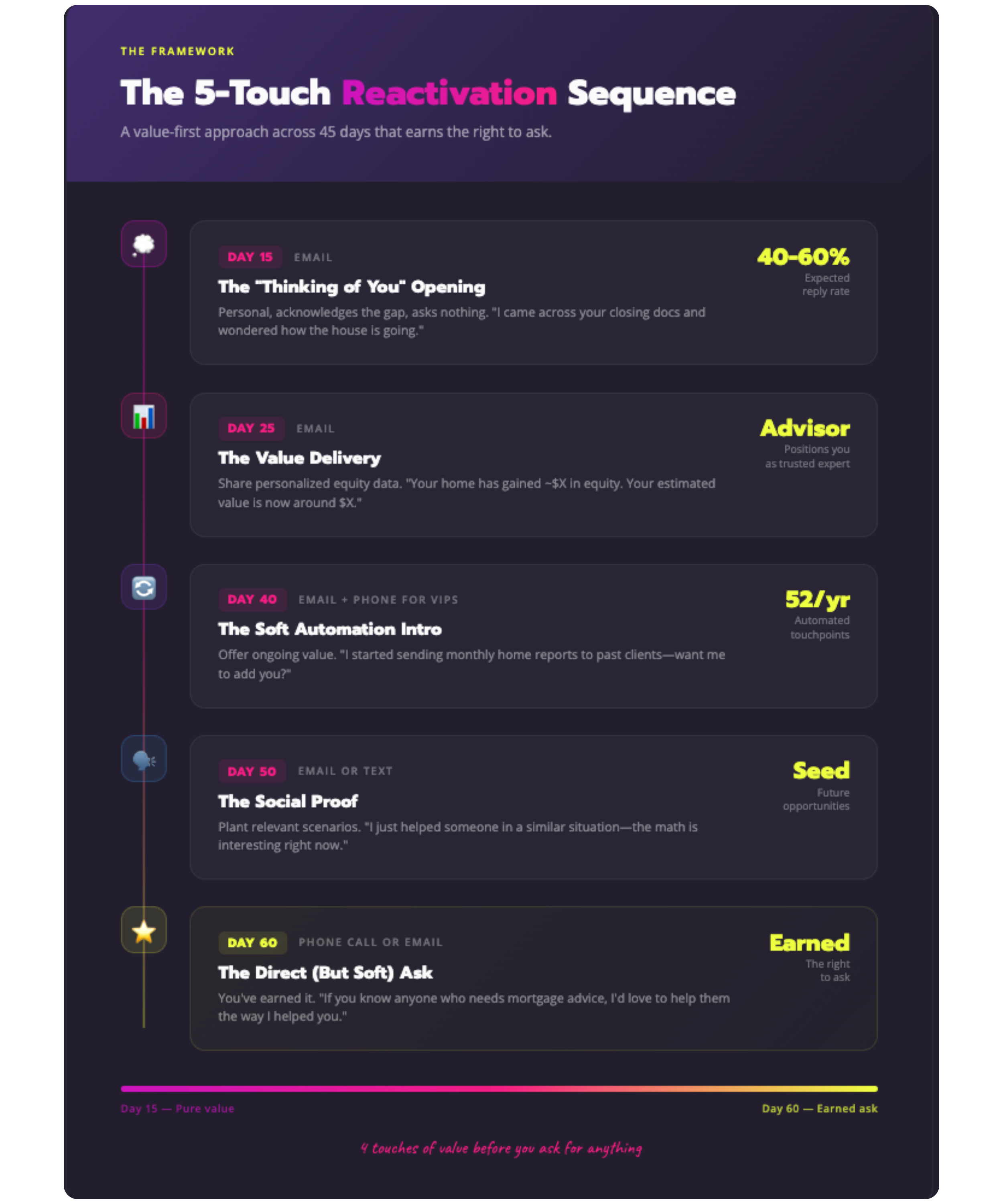
The 5-Touch Reactivation Sequence:
1. Touch 1 (Day 15): The "Thinking of You" Opening
Channel: Email
Subject line: "Quick question about [Property Address]"
Content:
"Hey [Name],
I was organizing my files this week and came across your closing documents from [Month/Year]—which made me wonder: how's everything going with the house on [Street Name]?
I know it's been a while since we talked (entirely my fault—I've been heads-down in transactions and terrible at staying in touch). But I was genuinely curious how everything's been.
Hope you and [family member name if you remember] are doing well.
[Your name]"
Why this works: It's personal, acknowledges the gap, asks nothing, and expresses genuine interest. About 40-60% of recipients will reply with a life update.
2. Touch 2 (Day 25): The Value Delivery
Channel: Email with useful information
Content:
"Hey [Name],
I don't know if this is relevant to you, but I just ran some numbers and thought you might find this interesting:
Your home on [Street Name] has gained approximately $[X amount] in equity since you purchased it in [Year]. That puts your current estimated value around $[X]—and your equity position at roughly $[X].
[IF RELEVANT: "With rates where they are, you might have some interesting options for accessing that equity if you ever needed it for [home improvements/investment/etc.]"]
No action needed on your part—just thought you'd want to know. Let me know if you'd like me to run any scenarios for you.
[Your name]"
**Note: These are estimates based on publicly available market data. For decisions involving refinancing or accessing equity, I recommend we run precise numbers specific to your situation.
Why this works: You're providing specific, personalized value. You're demonstrating you're thinking about THEIR financial situation, not just your pipeline. This positions you as an advisor, not a salesperson.
3. Touch 3 (Day 40): The Soft Introduction to Ongoing Value
Channel: Email (with phone call for VIP contacts)
Content:
"Hey [Name],
Quick question: are you currently tracking your home's value and equity position, or is this the first you've heard about the gains you've made?
I ask because I recently started sending monthly reports to some of my past clients—basically a personalized snapshot of their home value, equity, and what that means for their financial situation. Takes me zero effort (it's automated), but people seem to find it really helpful.
Would you want me to add you to that list? No obligation to do anything with the info—it's just there if you ever need it.
Let me know.
[Your name]"
Why this works: You're offering ongoing value without asking for anything in return. This is where you introduce automated tools like Homebot that do the heavy lifting for you.
4. Touch 4 (Day 50): The Social Proof
Channel: Email or text (text for warmer contacts)
Content:
"Hey [Name]—
Random, but I helped [mutual connection or past client name] last week with [situation], and it made me think of you.
Have you ever thought about [relevant scenario—investment property, vacation home, helping kids with first purchase, downsizing, etc.]?
I've had a few clients in situations similar to yours who've been exploring [option], and the math is pretty interesting right now.
Happy to run some numbers if you're ever curious—no pressure either way.
[Your name]"
Why this works: Social proof ("I just helped someone like you"), relevant scenario planting, low-pressure offer.
5. Touch 5 (Day 60): The Direct (But Soft) Ask
Channel: Phone call (if they've engaged) or email (if they haven't)
Content:
"Hey [Name],
I'm doing some business planning, and I wanted to reach out to the people who've meant the most to my business over the years. You're definitely on that list.
If you know anyone who's thinking about buying, selling, or could use some mortgage advice, I'd love to help them the same way I helped you. I promise I'll take great care of them.
And if not, no worries at all—I'm just glad we reconnected.
Thanks for everything, [Name].
[Your name]"
Why this works: You've earned the right to ask after 4 touches of pure value. You're framing it as an honor to be referred, not a desperate plea. You're giving them an easy out.
Phase 3: The Automation Layer (Days 61-90 and Beyond)
Here's the reality: you can't manually maintain 247 relationships at the level needed to stay top-of-mind.
But you also can't just set it and forget it with generic drip campaigns. People smell automation from a mile away, and nothing kills re-engagement faster than robotic, impersonal messages.
The solution? Strategic automation that delivers personalized value at scale.
This is where a platform like Homebot becomes your secret weapon. Instead of you manually:
- Tracking home values for 247 properties
- Calculating equity positions every month
- Identifying which clients might benefit from refinancing, HELOCs, or purchase opportunities
- Finding natural reasons to reach out
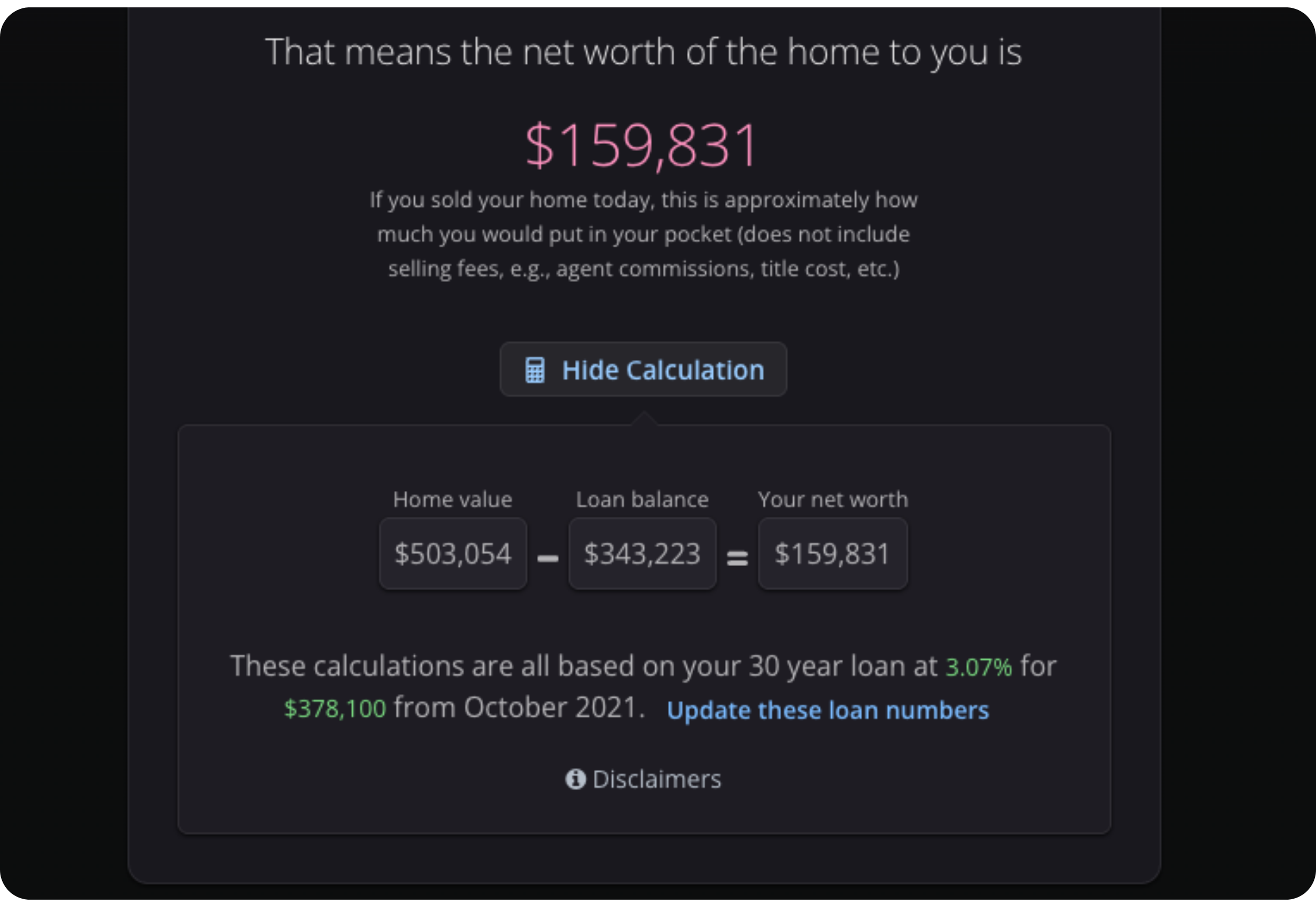
Homebot does it automatically, sending each client a personalized monthly digest with:
- Their specific home value and equity
- Market trends in their specific neighborhood
- Relevant financial scenarios (What if I refinanced? What if I bought an investment property?)
- Personalized insights based on their situation
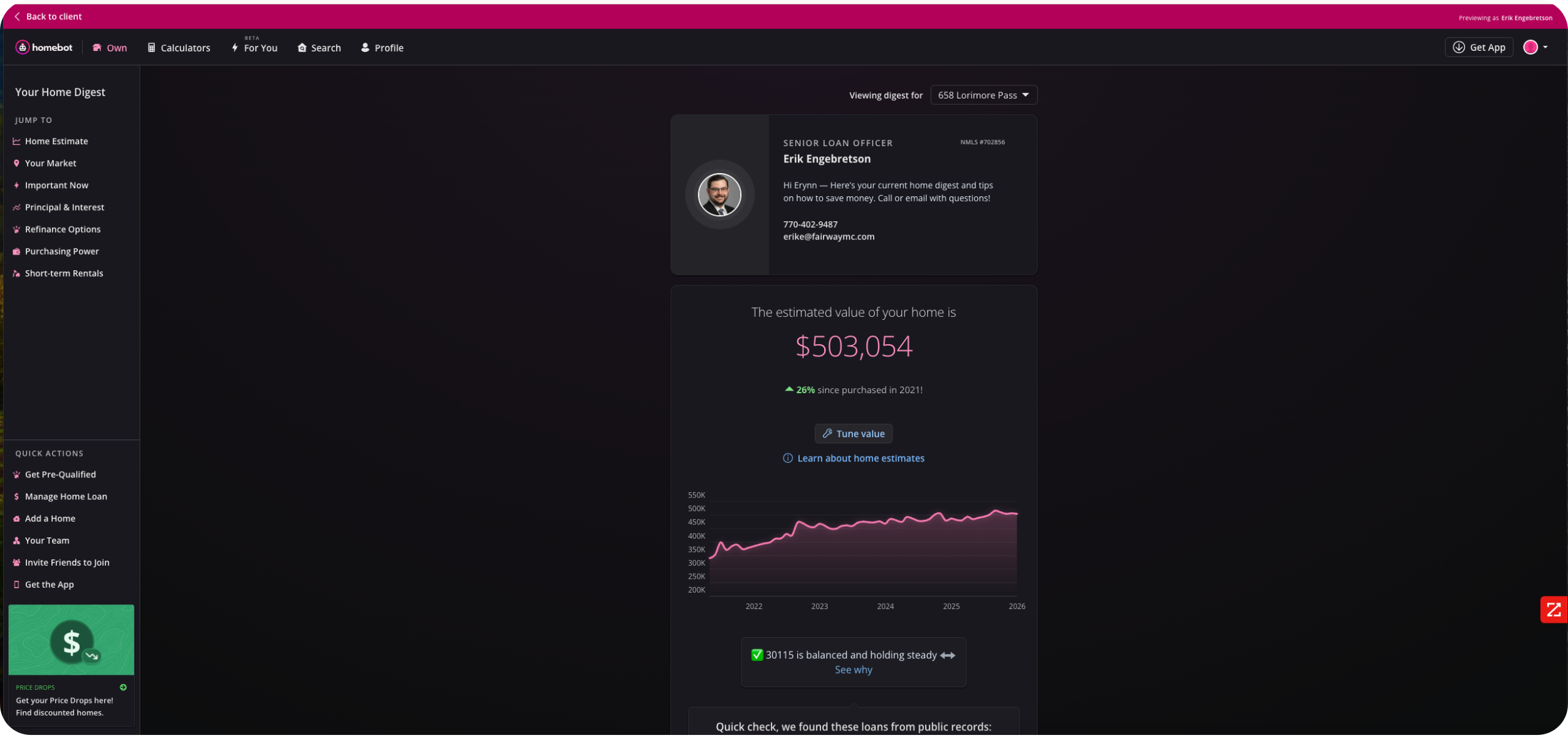
Each digest becomes a touchpoint that keeps you top-of-mind—52 per year, per client—without you lifting a finger.
Here's what this looks like in practice:
- Month 1 after reactivation: Client gets personalized digest showing they've gained $43K in equity
- Month 2: Digest shows their neighborhood appreciation is outpacing the county average
- Month 3: Client sees their purchasing power has increased to $685K (up from $625K when they bought)
- Month 4: Digest mentions current rates and includes HELOC comparison
At some point—maybe Month 3, maybe Month 8—that client thinks, "Huh, I should talk to [YOUR NAME] about this." Or their coworker mentions they're buying a house, and your name instantly comes to mind because they literally saw it two days ago.
That's the power of systematic, automated value delivery.
During Days 61-90, your job is to:
- Get reactivated contacts enrolled in your automated digest system
- Monitor engagement (who's opening, clicking, showing high interest)
- Personally follow up with high-engagement contacts
- Continue your manual outreach with contacts who haven't engaged yet
By Day 90, you should have:
- 60-70% of your database actively receiving valuable, personalized content from you monthly
- 10-15 meaningful conversations started
- 2-4 active leads or referrals in motion
- A system in place that maintains these relationships long-term without manual effort
What to Say (And What NOT to Say) When Reconnecting
The words you use during reactivation matter—a lot. Here's your messaging framework:
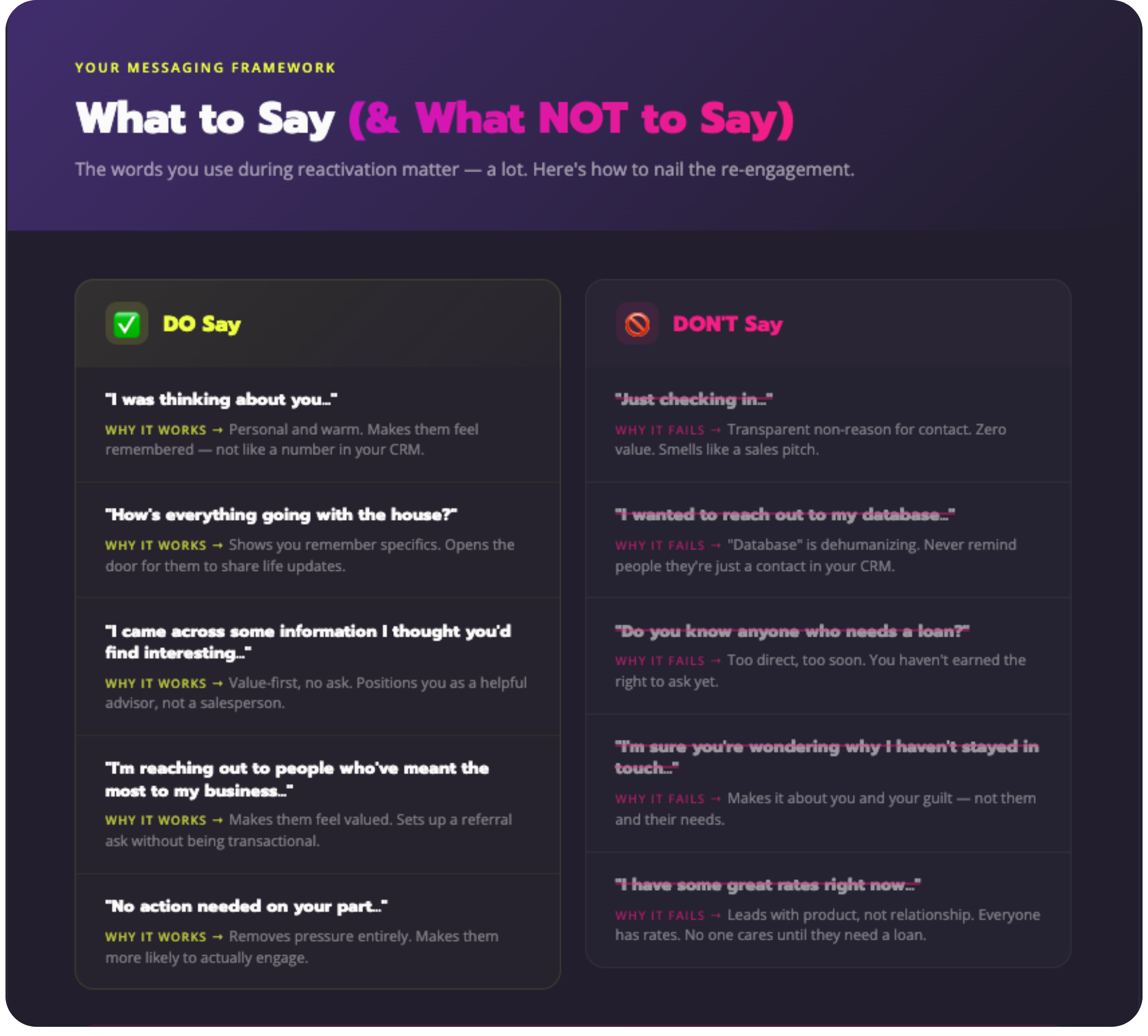
✅ DO Say:
- "I was thinking about you..."
Why it works: Personal, warm, makes them feel remembered (not like a number in your CRM) - "How's everything going with the house?"
Why it works: Shows you remember specifics about their situation, opens the door for them to share updates - "I came across some information I thought you'd find interesting..."
Why it works: Value-first approach, no ask, positions you as helpful advisor - "I'm reaching out to people who've meant the most to my business..."
Why it works: Makes them feel valued, sets up a referral ask without being transactional - "No action needed on your part..."
Why it works: Removes pressure, makes them more likely to engage
❌ DON'T Say:
- "Just checking in..."
Why it fails: Transparent non-reason for contact, offers zero value, smells like a sales pitch - "I wanted to reach out to my database..."
Why it fails: "Database" = dehumanizing. Never remind people they're just a contact in your CRM. - "Do you know anyone who needs a loan?"
Why it fails: Too direct too soon. You haven't earned the right to ask yet. - "I'm sure you're wondering why I haven't stayed in touch..."
Why it fails: Makes it about you and your guilt instead of them and their needs - "I have some great rates right now..."
Why it fails: Leads with product, not relationship. Everyone has rates. No one cares until they need a loan.
The Psychology of Re-Engagement
When you're reconnecting after a long gap, your contact is subconsciously asking three questions:
- "Why is this person reaching out NOW?" (Your answer: Because I was genuinely thinking of you / have relevant information for you)
- "What do they want from me?" (Your answer: Nothing right now—just wanted to provide value and reconnect)
- "Is this going to be awkward?" (Your answer: No—I'm acknowledging the gap casually and moving forward positively)
Address these three questions in your initial outreach, and you'll dramatically increase your response rate.
Automating Reactivation: How Top Producers Stay Consistent Without Burning Out
Let's address the elephant in the room: you're not going to manually stay in touch with 247 people.
You might do it for a month. Maybe two. Then you'll get busy with a rush of closings, or take a vacation, or deal with a family situation, and your database reactivation plan will fall apart.
This isn't a motivation problem. It's a systems problem.
Top-producing loan officers who maintain strong database relationships don't do it through superhuman discipline. They do it through intelligent automation that handles 90% of the touchpoints while freeing them up to personally handle the 10% that matter most.
Here's what that looks like:
The Automation Stack
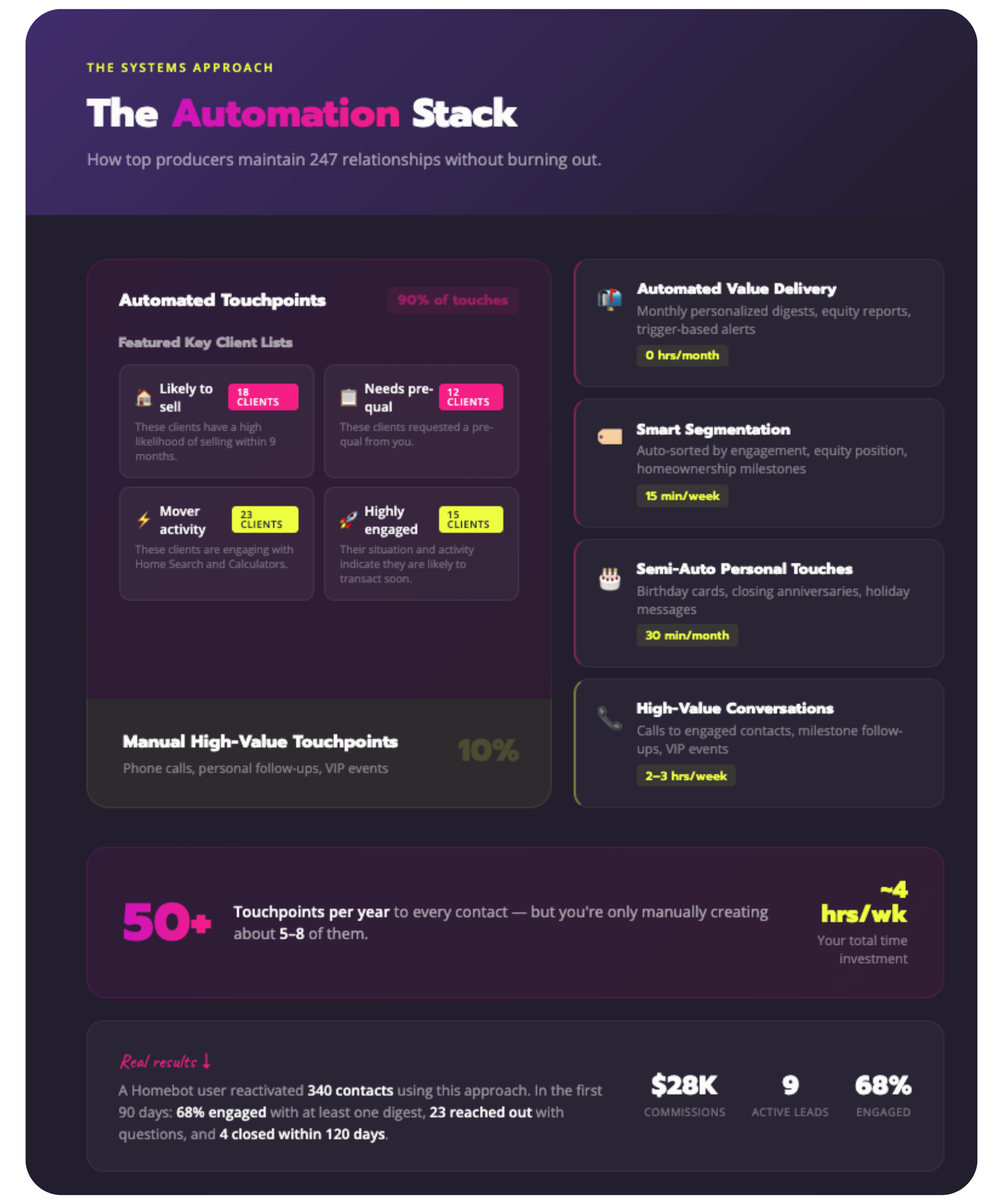
Automated Value Delivery (Homebot or similar)
- Monthly personalized digests to every contact
- Automated equity tracking and appreciation reports
- Trigger-based alerts when clients hit key milestones
- Automatically surfaced engagement data and high-opportunity contacts
Automated Segmentation
- CRM tags based on engagement level (opens digests, clicks through, high equity position, approaching 7-year homeownership mark)
- Auto-sorted lists of high-opportunity contacts
- Time investment from you: 15 minutes/week reviewing lists
Semi-Automated Personal Touchpoints
- Birthday/anniversary cards (automated but personalized)
- Closing anniversary emails (templated but customized with specifics)
- Holiday messages (scheduled but personal)
- Time investment from you: 30 minutes/month
Manual High-Value Touchpoints
- Phone calls to high-engagement contacts (those opening every digest, clicking through multiple times)
- Personal follow-up when clients reach specific milestones (7 years of homeownership, major equity gain, neighborhood hot market)
- In-person events for your VIP database segment
- Time investment from you: 2-3 hours/week
The Result:
Your 247 contacts receive 50+ touchpoints per year from you, but you're only manually creating about 5-8 of them. The rest happen automatically, keeping you top-of-mind without burning you out.
Case in point: One Homebot user, a loan officer in Arizona, reactivated a database of 340 contacts using this approach. In the first 90 days:
- 68% of contacts engaged with at least one digest
- 23 reached out with questions or scenarios
- 9 became active leads or referrals
- 4 closed within 120 days
Total time invested manually: about 4 hours per week. The ROI? Roughly $28,000 in commissions directly attributable to database reactivation.
That's the power of systematic automation paired with strategic personal touch.
Measuring Success: Key Metrics to Track Your Reactivation ROI
You can't improve what you don't measure. Here are the key metrics to track during and after your database reactivation:
Engagement Metrics
EmailOpen Rate
- Target: 35-45% for reactivation emails (vs. 20-25% industry average for cold outreach)
- What it tells you: Whether your subject lines and sender reputation are working
- Email Response Rate
- Target: 15-25% for your initial reactivation sequence
- What it tells you: Whether your messaging is resonating and prompting action
- Digest Engagement Rate
- Target: 40-60% open rate on monthly automated digests
- What it tells you: How many people find your ongoing value delivery relevant
- Click-Through Rate
- Target: 8-12% on digest content (clicking through to detailed scenarios, calculators, etc.)
- What it tells you: Who's actively exploring options and most likely to convert
Business Outcome Metrics
- Reactivation-Sourced Conversations
- Target: 3-5 per week during active reactivation period
- What it tells you: How many relationships you're successfully re-establishing
- Reactivation-Sourced Leads
- Target: 2-3 per month once your system is running
- What it tells you: How many real opportunities are coming from your database
- Reactivation-Sourced Closings
- Target: 10-15% of your total closings should come from database within 12 months
- What it tells you: The ultimate ROI of your reactivation efforts
- Referral Rate
- Target: 15-20% of reactivated contacts should refer someone within 18 months
- What it tells you: Whether you're truly top-of-mind for your database
How to Track This
The easiest approach:
- Tag reactivated contacts in your CRM with "[Year] Reactivation" or similar
- Create a simple spreadsheet with columns for: Name, Initial Outreach Date, First Response Date, Lead Source (if they convert), Closing Date (if applicable), Referrals Made
- Review weekly: Every Friday, look at your engagement data and identify who needs personal follow-up
- Review monthly: First of each month, calculate your key metrics and adjust your approach
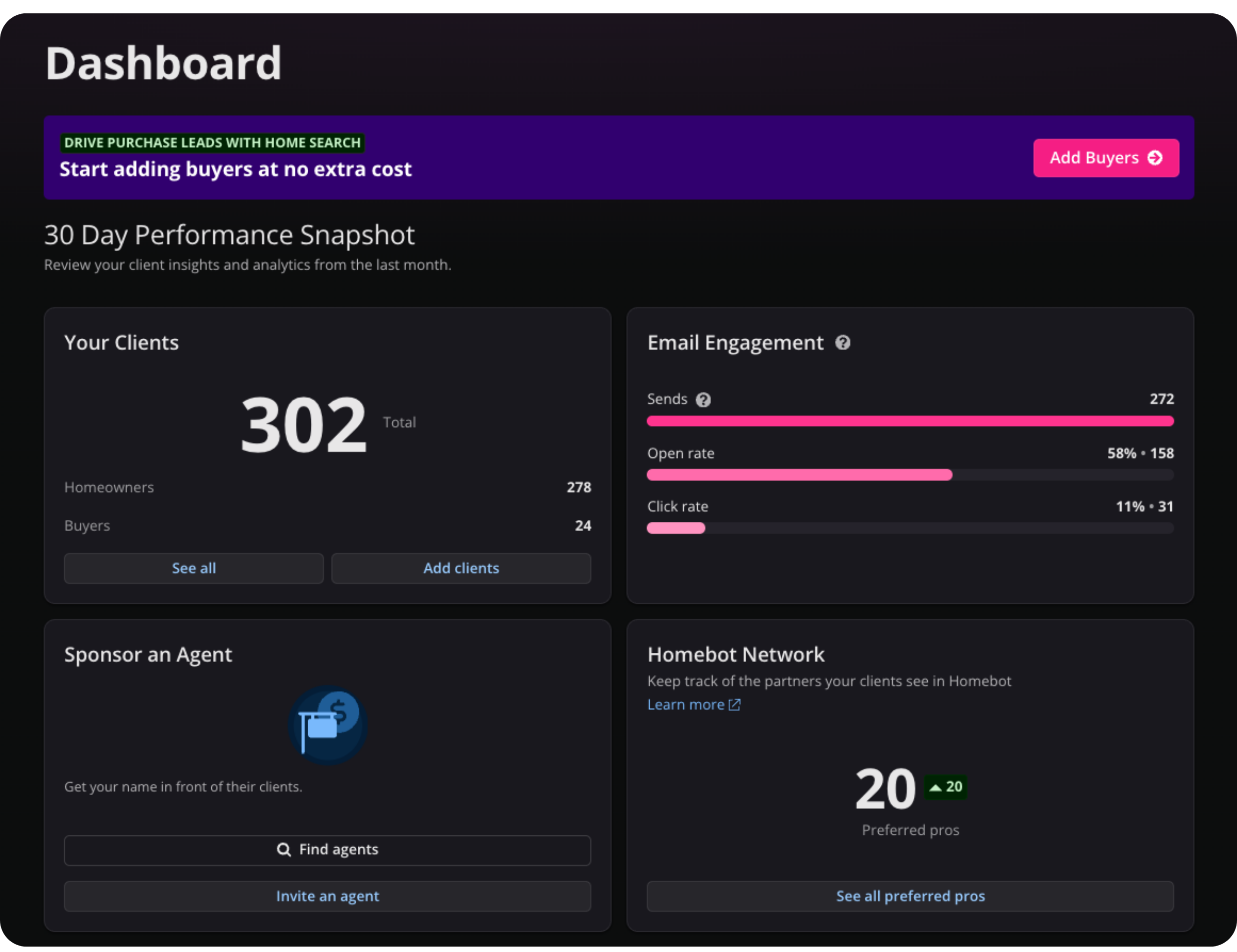
If you're using Homebot, much of this tracking happens automatically through the engagement dashboard, which shows you:
- Who's opening digests consistently (high engagement = high opportunity)
- Who's clicking through to specific scenarios (showing active interest)
- Who's gone cold (time for a personal touchpoint)
The goal isn't perfect tracking—it's having enough data to know what's working and where to focus your personal energy.
Your Database Reactivation Action Plan
Okay, you've got the framework. You've got the messaging. You've got the metrics.
Now it's time to actually do this.
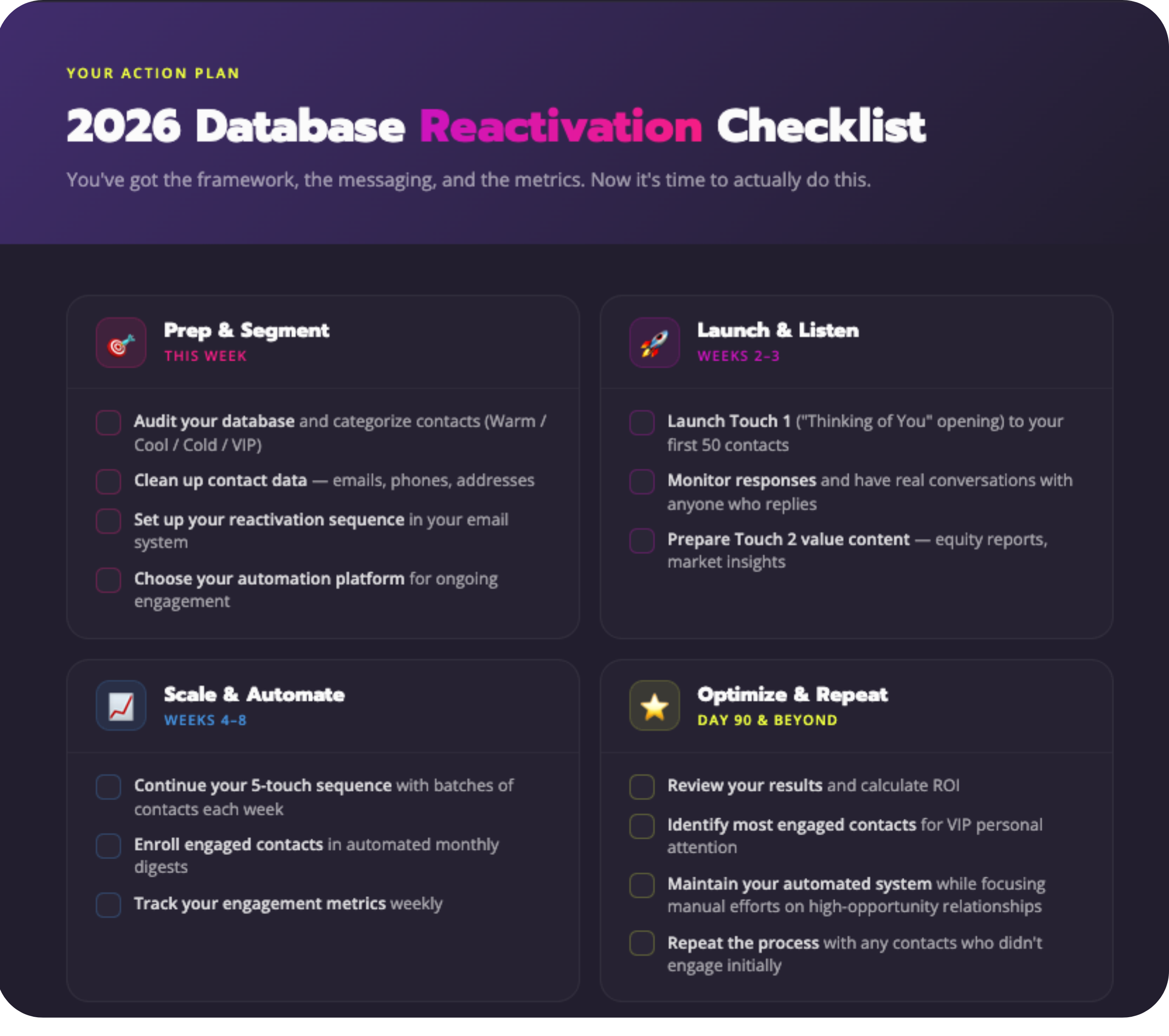
Your Next Steps:
- This Week:
- Audit your database and categorize contacts (Warm/Cool/Cold/VIP)
- Clean up contact data (emails, phones, addresses)
- Set up your reactivation sequence in your email system
- Choose your automation platform for ongoing engagement
- Weeks 2-3:
- Launch Touch 1 (The "Thinking of You" Opening) to your first 50 contacts
- Monitor responses and have real conversations with anyone who replies
- Prepare your Touch 2 value content (equity reports, market insights)
- Weeks 4-8:
- Continue your 5-touch sequence with batches of contacts each week
- Enroll engaged contacts in automated monthly digests
- Track your engagement metrics weekly
- Day 90 and Beyond:
- Review your results and calculate ROI
- Identify your most engaged contacts for VIP personal attention
- Maintain your automated system while focusing manual efforts on high-opportunity relationships
- Repeat this process with any contacts who didn't engage initially
The reality is this: Your database represents more potential income than any lead source you could buy, any ad you could run, or any networking event you could attend.
But only if you systematically reactivate it and consistently nurture it.
This can be the year you finally turn that dormant database into a reliable referral machine—but only if you start now.
Want to see how top-producing LOs are automating database reactivation? Schedule a Homebot demo to see exactly how our platform delivers 52 personalized touchpoints per year to every client in your database—without you lifting a finger.